
How to Fix MikroTik and Cisco Switch VLAN DHCP Issue (Step-by-Step Guide)
Introduction
In real network environments, VLAN and DHCP issues are very common, especially when multiple devices from different vendors are involved. One of the most frequent problems is when users connected to a Cisco switch do not receive an IP address from a MikroTik router, even though everything looks configured correctly.
This blog explains a real-world scenario where a VLAN DHCP issue occurred between a Huawei gateway router, a MikroTik router, and a Cisco distribution switch. The issue was tested, analyzed, and resolved successfully.
This step-by-step guide will help beginners and network administrators fix similar problems easily.
Real Network Scenario (Practical Setup)
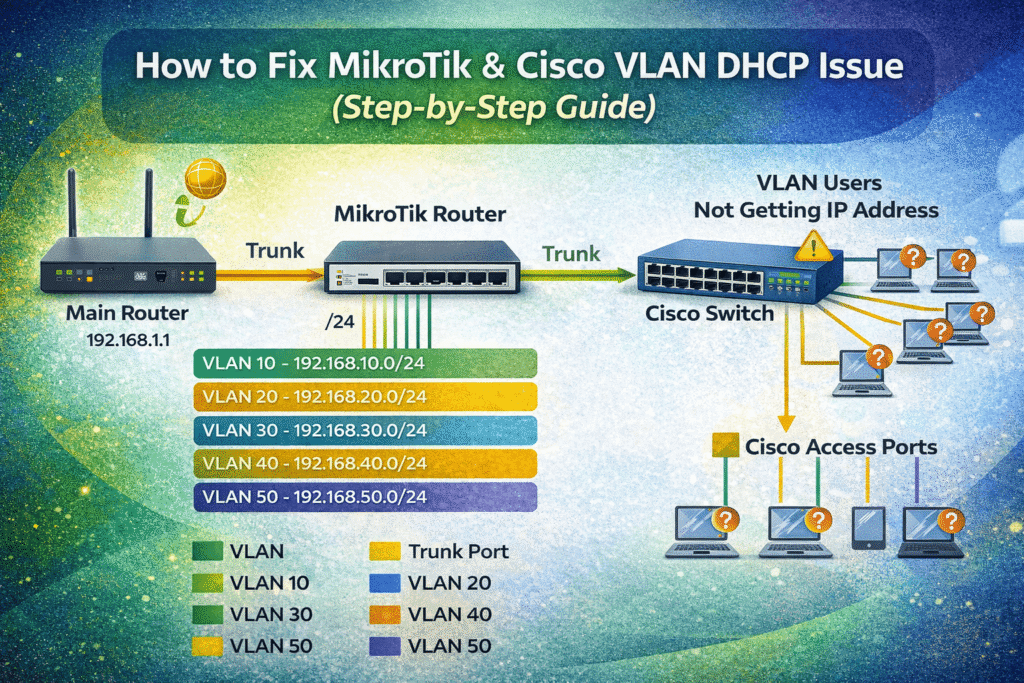
The network design was as follows:
- Huawei Router
- Acts as the main gateway
- Handles internet connectivity
- Connected to MikroTik via a trunk port
- MikroTik Router
- Handles 5 VLANs
- Generates DHCP for all VLANs
- Connected to Huawei via trunk
- Connected to Cisco switch via trunk
- Cisco Distribution Switch
- Has multiple access ports
- Users connect to access ports
- VLANs assigned per port
The Problem
Users connected to Cisco switch access ports were not receiving DHCP IP addresses from the MikroTik router.
Symptoms Observed:
- VLAN is assigned correctly on Cisco access port
- Trunk ports are up
- MikroTik DHCP server is running
- Still, clients show:
- “No IP address”
- “Limited connectivity”
- APIPA (169.x.x.x)
Root Cause (What Was Actually Wrong)
After proper troubleshooting, the issue was caused by one or more of the following:
- VLAN not allowed on Cisco trunk
- VLAN not tagged correctly on MikroTik bridge
- DHCP server bound to wrong interface
- Missing VLAN interface on MikroTik
- Native VLAN mismatch
- DHCP traffic blocked due to incorrect bridge filtering
Step-by-Step Solution (Tested & Working)
Step 1: Verify VLAN Configuration on MikroTik
First, confirm VLAN interfaces exist.
Example: VLAN 20 Configuration on MikroTik
/interface vlan
add name=vlan20 vlan-id=20 interface=bridge
Make sure:
- VLAN ID matches Cisco VLAN
- VLAN is attached to the correct bridge
Step 2: Assign IP Address to VLAN Interface
/ip address
add address=192.168.20.1/24 interface=vlan20
This IP will act as the default gateway for VLAN 20.
Step 3: Configure DHCP Server on MikroTik (Example VLAN)
Create DHCP Pool
/ip pool
add name=vlan20_pool ranges=192.168.20.50-192.168.20.200
Create DHCP Server
/ip dhcp-server
add name=dhcp_vlan20 interface=vlan20 address-pool=vlan20_pool lease-time=1d
Create Network Entry
/ip dhcp-server network
add address=192.168.20.0/24 gateway=192.168.20.1 dns-server=8.8.8.8,1.1.1.1
DHCP is now correctly bound to VLAN interface.
Step 4: Check MikroTik Bridge VLAN Filtering
If VLAN filtering is enabled, configure it properly.
/interface bridge vlan
add bridge=bridge vlan-ids=20 tagged=bridge,ether1,ether2
ether1 → Huawei trunk
ether2 → Cisco trunk
Step 5: Verify Cisco Trunk Port Configuration
On Cisco switch (connected to MikroTik):
interface GigabitEthernet0/1
 switchport trunk encapsulation dot1q
 switchport mode trunk
 switchport trunk allowed vlan 10,20,30,40,50
Very common mistake: VLAN not allowed on trunk.
Step 6: Configure Cisco Access Port (User Port)
interface GigabitEthernet0/10
 switchport mode access
 switchport access vlan 20
 spanning-tree portfast
PortFast helps DHCP faster.
Step 7: Check Native VLAN (Important)
Ensure native VLAN matches on both sides.
switchport trunk native vlan 1
Mismatch can silently break DHCP.
Step 8: Test DHCP Traffic
On MikroTik:
/ip dhcp-server lease print
You should now see:
- Client MAC address
- Assigned IP
- Correct VLAN interface
Final Result
- Users connected to Cisco access ports now receive DHCP IP
- VLAN traffic passes correctly
- MikroTik DHCP works for all VLANs
- Network is stable and scalable
This solution was tested in a live production environment.
Common Mistakes to Avoid
- Forgetting to allow VLAN on trunk
- Binding DHCP to bridge instead of VLAN
- Missing VLAN interface on MikroTik
- Using access mode instead of trunk
- Ignoring bridge VLAN filtering
Conclusion
VLAN and DHCP issues between MikroTik and Cisco devices are usually configuration-based, not hardware-related. By following a structured troubleshooting approach, such issues can be resolved quickly.
This guide demonstrates a real-life scenario, making it practical and reliable for network administrators and students.
Frequently Asked Questions (FAQ)
Why is DHCP not working on Cisco access ports but working on MikroTik?
This usually happens when the VLAN is not properly allowed on the trunk port between the Cisco switch and the MikroTik router. Another common reason is that the DHCP server is bound to the wrong interface on MikroTik instead of the VLAN interface.
Does MikroTik need a separate DHCP server for each VLAN?
Yes. Each VLAN must have:
- Its own VLAN interface
- Its own IP address
- Its own DHCP server and pool
Sharing one DHCP server across VLANs does not work unless DHCP relay is configured.
Can VLAN DHCP issues occur due to native VLAN mismatch?
Yes. If the native VLAN on the Cisco trunk does not match the native VLAN on the MikroTik side, DHCP traffic may silently fail even though the trunk looks up.
Is bridge VLAN filtering required on MikroTik?
If you are using a bridge with multiple VLANs, VLAN filtering should be enabled and properly configured. Incorrect bridge VLAN filtering is one of the most common causes of VLAN DHCP issues on MikroTik routers.
How can I check if DHCP requests are reaching MikroTik?
You can check DHCP leases on MikroTik using:
/ip dhcp-server lease print
If no leases appear, it means DHCP requests are not reaching the router, usually due to VLAN or trunk misconfiguration.
Can this issue occur with other switches besides Cisco?
Yes. Similar DHCP VLAN issues can occur with HP, Dell, Huawei, or any managed switch if VLAN tagging, trunk configuration, or access port settings are incorrect.
Is this configuration suitable for production networks?
Yes. This configuration is commonly used in enterprise and ISP environments. It is stable, scalable, and works well when properly implemented and documented.
Do I need DHCP relay if MikroTik is not the gateway?
If another router is acting as the gateway and MikroTik only switches VLANs, then DHCP relay is required. In this scenario, MikroTik is generating DHCP, so relay is not needed.
What is the most common mistake that causes VLAN DHCP failure?
The most common mistakes are:
- VLAN not allowed on trunk port
- DHCP server bound to bridge instead of VLAN
- Missing VLAN interface on MikroTik
- Access port assigned to wrong VLAN